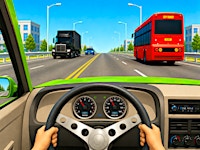
Racing In City
Racing In City Mods Game
Backrooms
Sprunki Rareshifted But Shifted
Blocky Runner
Jelly Runner
Brainrot Park
Neon Rush
Parking Adventure
Temple Of Boom

Retro Sports Champion
Bowling Master
Survival Race
Escape From Tsunami Brainrot
Aqua Bits
Sprunki Fake Skymon
Sprunki Phase 2 5 Definitive Edition Old Version
Sprunki Phase 10 Remastered Keshas Take
Sprunki Definitive Phase 7 Sb3

Noob Miner Escape From Prison

Collect Brainrot Arena

Family Simulator





How To Play Racing In City
The gameplay loop of “Racing in City” is simple yet demanding. The player controls a vehicle on a multi-lane highway filled with civilian traffic. The primary goal is to drive through the traffic without colliding. A crash ends the run, but players can immediately retry.
Controls and Basic Mechanics
- Steering and Acceleration: Use the WASD or Arrow Keys to drive. W/Up accelerates, S/Down brakes or reverses, and A/Left and D/Right steer.
- Slow Motion: Press Shift to activate slow motion. This feature slows down time, giving the player a brief window to make precise maneuvers, especially useful when navigating tight gaps or avoiding multi-car pileups.
- Scoring: Points are awarded based on distance traveled and the riskiness of driving behavior. Driving at maximum speed and executing near-misses with civilian traffic triggers massive score multipliers. The more dangerous the overtake, the higher the bonus.
Career Mode and Progression
The game includes a substantial Career Mode. Players complete a series of missions—such as reaching a certain distance, overtaking a number of cars, or driving at top speed for a set time. Successful missions yield in-game currency, which can be used to:
- Unlock new vehicles from the roster of 13 cars.
- Upgrade engine performance (speed, acceleration, handling).
- Customi
Racing In City Wiki
Summary
“Racing in City” is a realistic 3D traffic driving game that thrusts players into the heart of a bustling urban highway system. Developed with an immersive behind-the-wheel perspective, the game challenges players to weave through dense traffic at high speeds, execute precision overtakes, and complete a series of career missions to earn rewards. The core objective is straightforward: drive as far as possible without crashing, while accumulating points through risky maneuvers and close passes. Every second on the road counts, and the farther you travel unscathed, the higher your score climbs.
The game offers a robust progression system. Players begin with a standard vehicle and can unlock up to 13 unique cars, ranging from sleek sports cars to rugged off-road SUVs. Each vehicle delivers a distinct driving feel, and the garage allows for deep customization—changing paint colors, rims, spoilers, and even brake calipers. Engine performance upgrades further enhance speed and handling, giving players a tangible sense of growth and ownership.
“Racing in City” is designed for desktop browsers and uses keyboard controls (WASD or arrow keys). It also features a slow-motion mechanic (Shift key) that adds a cinematic layer to tense moments. The game includes a global leaderboard, allowing players to compete for the best scores worldwide. For those who crave more high-octane action, the platform also offers related titles such as “Night City Racing,” “Grand City Racing,” and “Grand City Stunts,” each expanding on the adrenaline-fueled formula.
This title appeals to fans of arcade racing, traffic weaving, and vehicle customization, offering a balanced mix of risk, reward, and progression. It is a single-player experience that demands quick reflexes, strategic risk-taking, and a steady nerve behind the virtual wheel.
ze appearance: paint the chassis, change rims, attach spoilers, and recolor brake calipers individually.
Leaderboard and Replayability
Your best score is uploaded to a global online leaderboard, allowing you to compare your driving prowess against players worldwide. This competitive element encourages repeated runs and riskier strategies to climb the ranks.
Tips for New Players
- Start by familiarizing yourself with the slow-motion mechanic. Use it when approaching dense traffic or unexpected obstacles.
- Focus on clean runs first—avoiding crashes is more important than risky overtakes for earning consistent rewards.
- Save currency to unlock a faster car early; speed makes it easier to trigger multipliers and complete missions.
- Customization is cosmetic only, but it can help you quickly identify your vehicle in the heat of the moment.
Key Features
-
Realistic 3D Highway Driving – A behind-the-wheel camera angle puts you directly in the driver’s seat, amplifying the sensation of speed and danger. The traffic AI behaves unpredictably, requiring constant attention.
-
13 Unique Vehicles – From nimble sports cars to heavy off-road SUVs, each vehicle has distinct attributes. Unlocking and upgrading them adds depth to the progression system.
-
Deep Customization – Players can personalize every aspect of their car’s appearance: chassis paint, wheel rims, spoilers, and brake caliper colors. This level of detail allows for unique, standout designs.
-
Risk-Reward Scoring – The game encourages aggressive driving. Speeding through traffic and executing close overtakes triggers point multipliers, rewarding players who dare to push the limits.
-
Slow-Motion Mechanic – The Shift-key slow-motion feature adds a tactical layer. It can be used to navigate tight spots, avoid collisions, or simply enjoy a cinematic replay of a daring pass.
-
Career Mode – A structured set of missions provides clear goals and rewards, giving the game a sense of purpose beyond endless driving. Completing missions unlocks new content and upgrades.
-
Global Leaderboard – Your best score is ranked against other players worldwide, fostering a competitive community and encouraging repeated play to improve.
-
Browser-Based Accessibility – No download or installation required. The game runs directly in a desktop browser, making it easy to jump in and play.
-
Related Titles – The platform offers similar high-octane experiences like “Night City Racing” (neon-lit streets with split-screen multiplayer), “Grand City Racing” (circuit races and customization), and “Grand City Stunts” (aerial stunts and ramps), expanding the universe for enthusiasts.
Precautions/Tips
Gameplay Precautions
- Collisions End Runs – A single crash immediately ends the current drive. Always prioritize avoiding traffic over scoring points. The slow-motion feature is your best tool for last-second evasions.
- Speed Management – While high speed is rewarded, excessive velocity can make steering overly sensitive. Learn to modulate speed when approaching dense traffic zones.
- Risk vs. Consistency – Aggressive near-misses yield high multipliers but also increase crash probability. For grinding currency in Career Mode, safer driving may be more efficient. For leaderboard climbing, take calculated risks.
Technical Precautions
- Desktop Only – The game is optimized for desktop browsers with keyboard controls. Mobile or touch-screen devices are not supported. Ensure you have a stable internet connection for leaderboard updates.
- Browser Compatibility – Modern browsers (Chrome, Firefox, Edge) work best. Disable any extensions that might interfere with keyboard input or game performance.
- Slow-Motion Battery – The slow-motion effect may have a limited activation duration (or cooldown) in some versions. Use it sparingly and only when necessary.
Strategic Tips
- Prioritize Unlocks – Early in the game, focus on unlocking a faster car rather than cosmetic upgrades. Speed directly improves your ability to chain multipliers and complete missions.
- Learn Traffic Patterns – Civilian cars tend to follow lanes but may change speed unpredictably. Observe patterns to anticipate openings.
- Use Slow Motion for Tight Gaps – When approaching a narrow space between two cars, activate slow motion to precisely steer through. Practice this to build muscle memory.
- Customization as Motivation – While cosmetic changes don’t affect performance, they can make the experience more enjoyable. Customize your car to reflect your personal style and keep the game fresh.
- Restart Early – If you feel a run is going poorly (e.g., you just barely avoided a crash and are now at low speed), consider restarting to maximize your time and potential score.
- Study the Leaderboard – Observe the scores of top players. If possible, watch replays (if available) to learn advanced routes or risk-taking patterns.
Racing In City Frequently Asked Questions
Q: How do I play and dominate the streets in Racing in City?
A: Drive through traffic without crashing, complete Career Mode missions to earn rewards, drive at high speed and make close overtakes for bonus points, unlock new cars and upgrade their performance, customize your vehicles with paint, wheels, spoilers, and more, and climb the worldwide leaderboard by setting your best score.
Q: How do I trigger massive score multipliers?
A: Drive at maximum speeds and execute dangerous near-misses with civilian traffic to trigger epic point multipliers.
Q: Can I fully customize my dream street racer?
A: Absolutely! Unlock 13 unique cars and customize everything – paint your chassis, change rims, attach spoilers, and even color your brake calipers individually to stand out.
Q: What makes the driving experience so realistic?
A: The immersive behind-the-wheel camera angle puts you right in the driver's seat, combined with intense slow-motion mechanics that make you feel every heartbeat of the race.
Q: Is there a progression system or just endless driving?
A: There is a massive Career Mode where you prove your ultimate driving skills by completing challenging missions, upgrading your engine, and dominating the global leaderboards.
Q: Does Racing in City have a leaderboard?
A: Yes. Your best scores can compete against players worldwide on the global online leaderboard.
Q: Can I play Racing in City on mobile?
A: The version on TwoPlayerGames is designed primarily for desktop browsers using keyboard controls.
Q: What are the controls for Racing in City?
A: Use WASD or Arrow Keys to drive, and press Shift for slow motion.
Q: How many vehicles are available in the game?
A: There are 13 unique vehicles to choose from.
Q: What types of vehicles can I drive?
A: You can choose from powerful sports cars and rugged off-road SUVs, each offering a different driving experience.
Q: What can I customize on my vehicles?
A: You can customize paint colors, rims, spoilers, and brake calipers.
Q: How do I earn money in Racing in City?
A: Complete Career Mode missions to earn money for brand-new vehicles.
Q: How do I unlock new cars?
A: Earn money by completing missions, then use it to unlock faster cars and upgrade engine performance.
Q: What is the goal of the game?
A: Drive through busy highways without crashing, overtake cars at high speed, complete career missions, and achieve the highest score possible.
Q: What is the recommended way to increase my score?
A: Drive at maximum speeds, perform close overtakes without crashing, and trigger multipliers through risky maneuvers.
Q: Are there other similar high-octane city racing games on TwoPlayerGames?
A: Yes, you can also check out Night City Racing, Grand City Racing, and Grand City Stunts for more intense racing and stunt action.
Q: Does the game support slow motion?
A: Yes, you can activate slow motion by pressing the Shift key.